Job Search
How to Search and Apply for Internships, Fellowships, and Jobs
A hands-on walkthrough of the actual platforms I use, what to click, what to filter, what to watch out for, and what I learned from going through this process myself.
Before you start: what I wish someone had told me
I spent most of my sophomore and junior year applying to jobs through LinkedIn, Indeed, Handshake, and a software engineering job list I subscribed to that sent me over 1,000 postings per day during peak season. I even used a click counter to track how many applications I had submitted. Looking back that was a mistake, a count of applications with no other information tells you nothing useful. Most of what I applied to either ghosted me or sent a rejection.
The problem was not that I was not trying hard enough. The problem was that I was using the wrong strategy. I was applying to roles I did not fully want, using materials that were not tailored, to companies I had not researched, on platforms built for a different kind of candidate than I was trying to be.
This guide documents what I actually do now, platform by platform, step by step. It is not a list of resources, it is a walkthrough of how to use them. Some of what I share is what works. Some of it is honest about what does not.
The research I am doing this summer on ethics-aligned careers found that the information about mission-driven and public interest technology career paths is genuinely hidden, it does not travel through normal computing department channels. Most computing students never find these platforms unless they are specifically looking for them (Kirdani-Ryan, Ko & Borisova, 2023). That is part of why this guide exists.
Platform 1: Handshake, where to start as a college student
Handshake (joinhandshake.com) is designed specifically for college students and recent graduates. Companies recruiting here are actively looking for people at your stage, which makes it different from LinkedIn or Indeed. Your school career center connects your account to your university so employers can see you are a verified student.
It is the platform I use most for on-campus recruiting and entry-level roles.
How to set up your Handshake account and profile
- Go to joinhandshake.com and sign up using your university email. This connects you to your school's Handshake network automatically.
- Complete your profile. Handshake uses your profile to match you with relevant jobs, so the more complete it is the better your recommendations get. Add your major, graduation year, Grade Point Average if you want to, work experience, and skills. The platform shows you a profile completion percentage, aim for at least 80%.
- Upload your resume. Go to your profile, click Documents and upload a PDF version of your resume. Once it is uploaded you can attach it to applications with one click rather than uploading it fresh every time.
- Update your career interests. Handshake will prompt you with "Want to see more relevant jobs? Update career interests." Click this and fill in your job types, roles, and industries. The more specific you are here the better your feed becomes over time.
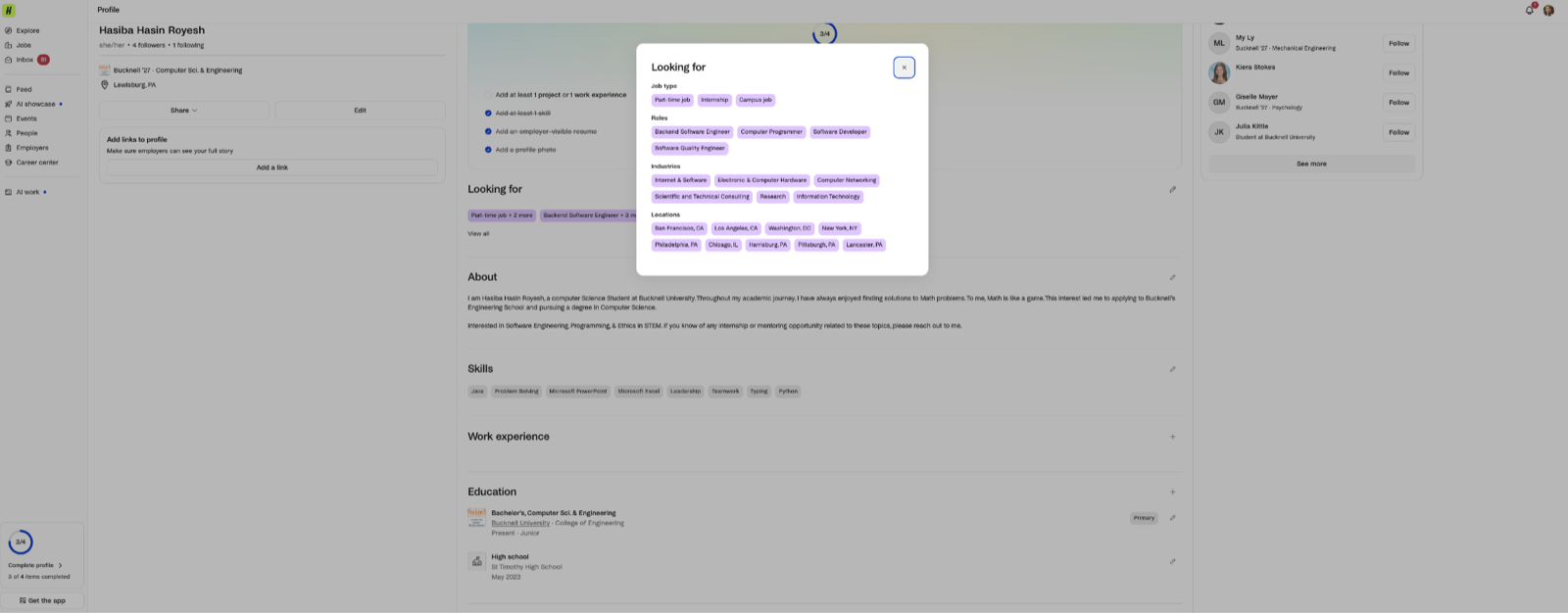
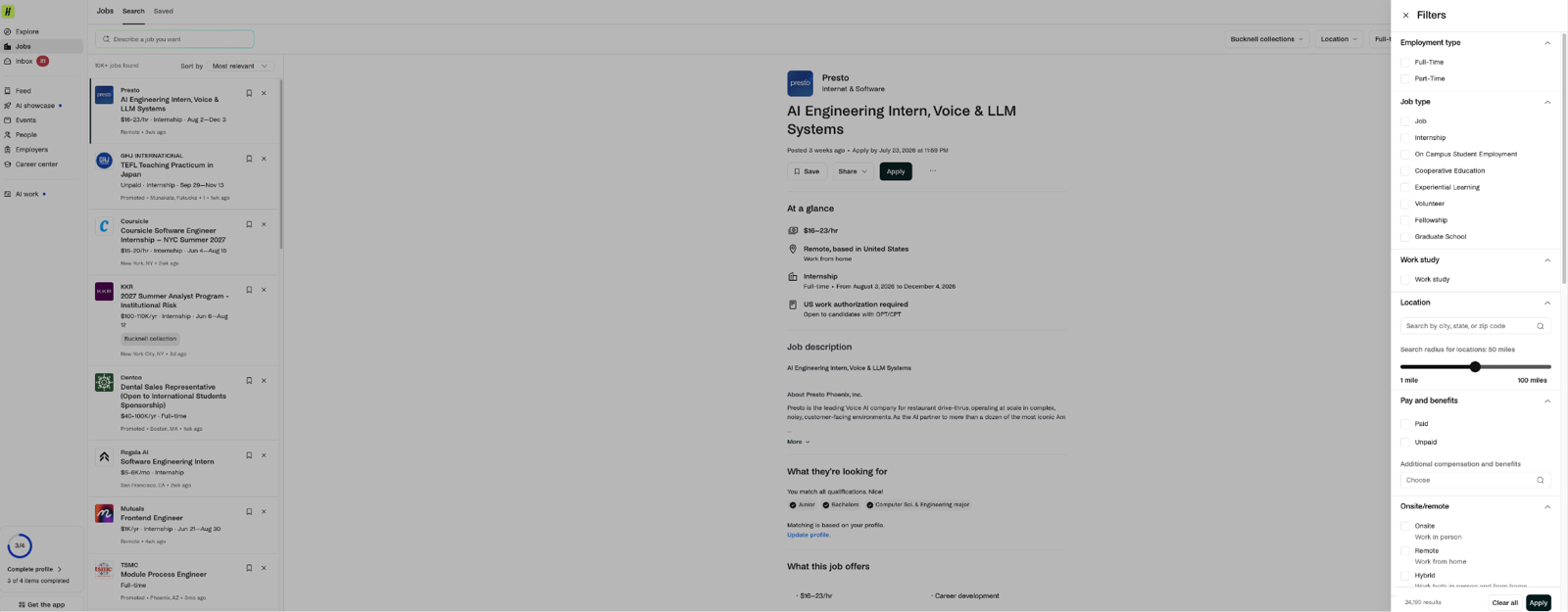
How to search for jobs on Handshake
- Click "Jobs" in the left sidebar. You will see a search bar at the top and a feed of job recommendations below. The search bar says "Describe a job you want."
- Use the filters at the top right. This is the most important part. The main filters are: Location, Full-time job, Internship, Part time, and a Filters button that opens more options. You can also filter by "Bucknell collections" which shows roles that Bucknell has specifically curated or where alumni have worked.
- Open the full Filters panel by clicking the Filters button on the far right. Here you can filter by job type (internship, full-time, part-time), work authorization requirements, remote versus in-person, industry, job function, and more. I usually filter by: role type related to my major, location or remote, entry-level, my major, and the type of opportunity I am looking for like internship.
- Sort by Most Recent rather than Most Relevant. The default sort is Most Relevant but Most Recent shows you what was just posted, which is important for catching postings before they close or before they get hundreds of applications.
- Save searches and set up alerts. After running a search with your filters, save it. Handshake will email you when new postings match that search. This is how you stop having to check manually every day.
The fake email problem on Handshake
One thing I have noticed is that I receive a lot of artificial intelligence-generated emails from people claiming to be hiring managers or startup recruiters, offering roles or conference invitations. These come to the email connected to my Handshake profile. The challenge is that it is genuinely hard to tell which ones are real.
Here is how I try to tell them apart:
- Real hiring outreach usually references something specific about your profile or background, names a real role at a real company you can verify on LinkedIn, and has a professional email domain that matches the company
- Generic or artificial intelligence-generated outreach often uses very generic language about being "impressed by your profile," offers vague descriptions of the opportunity, comes from a Gmail or personal email rather than a company domain, and does not mention anything specific about what you have done
- When in doubt, search the company name on LinkedIn and check if it exists, has real employees, and is actually hiring. If you cannot verify it in two minutes it is probably not worth your time
Platform 2: LinkedIn, best for networking alongside searching
LinkedIn (linkedin.com/jobs) is where I go when I want to see if anyone from my network or Bucknell alumni works at a company I am considering. That context changes how I approach an application and sometimes gets me a referral or an informational conversation before I apply.
How to search for jobs on LinkedIn
- Click "Jobs" in the top navigation bar. This takes you to the main job search page.
- Enter a job title or keyword in the search bar and a location. You can also leave location blank and filter for remote later.
- Use the filters below the search bar. The key ones are: Date posted (set to Past week or Past month to avoid old listings), Experience level (set to Entry level or Internship), Job type (Internship, Full-time, Part-time), and Remote (filter for On-site, Remote, or Hybrid).
- Check who you know at the company. Before applying to anything, click on the job posting and look for "How you match" and "People" sections. LinkedIn shows you if any of your connections or Bucknell alumni work there. If someone does, reach out before you apply, a warm introduction is more effective than a cold application.
- Set up job alerts. After running a search with your filters, click "Set alert" to get notified by email when new matching jobs are posted. The more specific your search the more useful the alert.
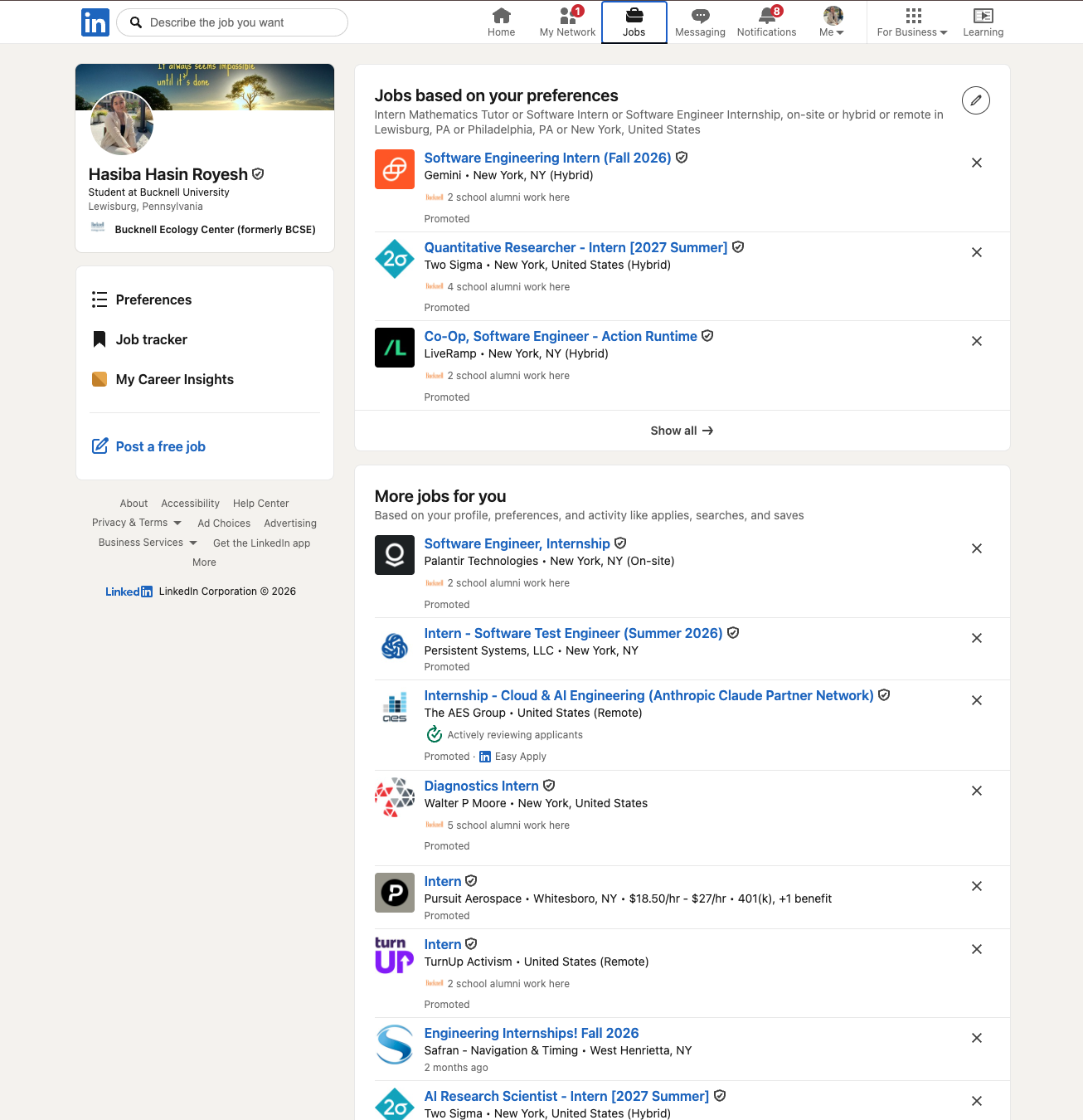
Easy Apply versus regular applications on LinkedIn
LinkedIn has two types of applications. Easy Apply lets you submit using your pre-uploaded LinkedIn profile and resume without leaving the platform. Regular applications take you to an external website to complete.
Easy Apply is fast and you can do it in under two minutes. The tradeoff is that everyone else can do it just as fast, which means competition is high and your application may get less attention. For roles you really want, a full application through the company website with a tailored resume and cover letter is worth the extra time. For roles you are less certain about or want to explore, Easy Apply is fine.
Before using Easy Apply, make sure your LinkedIn profile and uploaded resume are up to date. LinkedIn will use whatever is currently there.
Platform 3: Indeed, useful for broader searches
I use Indeed (indeed.com) less than Handshake and LinkedIn, but it is useful for roles outside of traditional computing, things like data roles at nonprofits, research positions, or jobs in adjacent fields that might not show up on the more computing-focused platforms. I have also found that government and nonprofit postings sometimes appear on Indeed before they appear on Handshake.
How to search on Indeed
- Go to indeed.com and enter a job title and location in the search bars at the top.
- Use the filters. The key ones for students are: Date posted (filter to Last 7 days or Last 14 days to avoid stale listings), Experience level (Entry Level), Job type (Internship or Full-time), and Salary (useful for filtering out unpaid or extremely low-paid roles).
- Read the full posting before applying. Indeed aggregates postings from many sources and some of them are outdated or duplicates. Always check when the posting was added and whether the application link actually works.
Platform 4: The software engineering job list, what mass volume actually looks like
I subscribed to a software engineering job list early in my junior year by searching for one on Google. The first result was the list I ended up using. The sign-up process was simple, enter your email and you start receiving daily job postings. No application form, no approval process, immediate access.
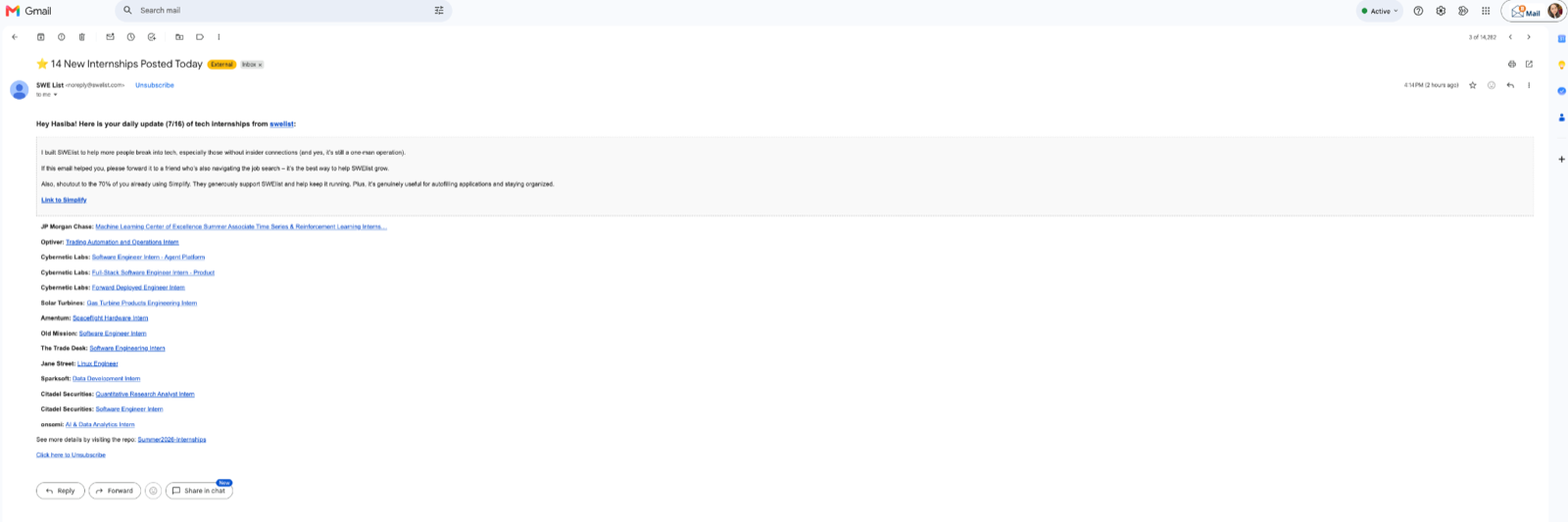
The software engineering list is useful for staying aware of the market and occasionally catching a role you would not have found otherwise. It is not useful as a primary job search strategy. Use it as one signal among many, not as your main approach.
Platform 5: All Tech Is Human Slack, where the hidden opportunities are
This is the platform I found most useful for the kind of work I actually want to do. I put off signing up for it for weeks because I was not sure it would be worth the extra step. It was worth it.
How to sign up, step by step
- Go to alltechishuman.org and look for Resources in the navigation, then the Slack Community. Or go directly to alltechishuman.org/slack-community.
- Read the community description. The page describes a community of over 14,000 members across 115 countries. This is not a small niche forum.
- Click "Apply to join our Slack." This opens a Google Form. The form asks your name, professional background, interest in responsible tech, and what you hope to get from the community. It took me about five minutes.
- Submit and wait for your invitation email. Unlike LinkedIn or Handshake where you are in immediately, there is a short wait for approval. Plan ahead if you want to use this for an active job search.
- Click the invitation link in your email and create your Slack account or sign in if you already have one.
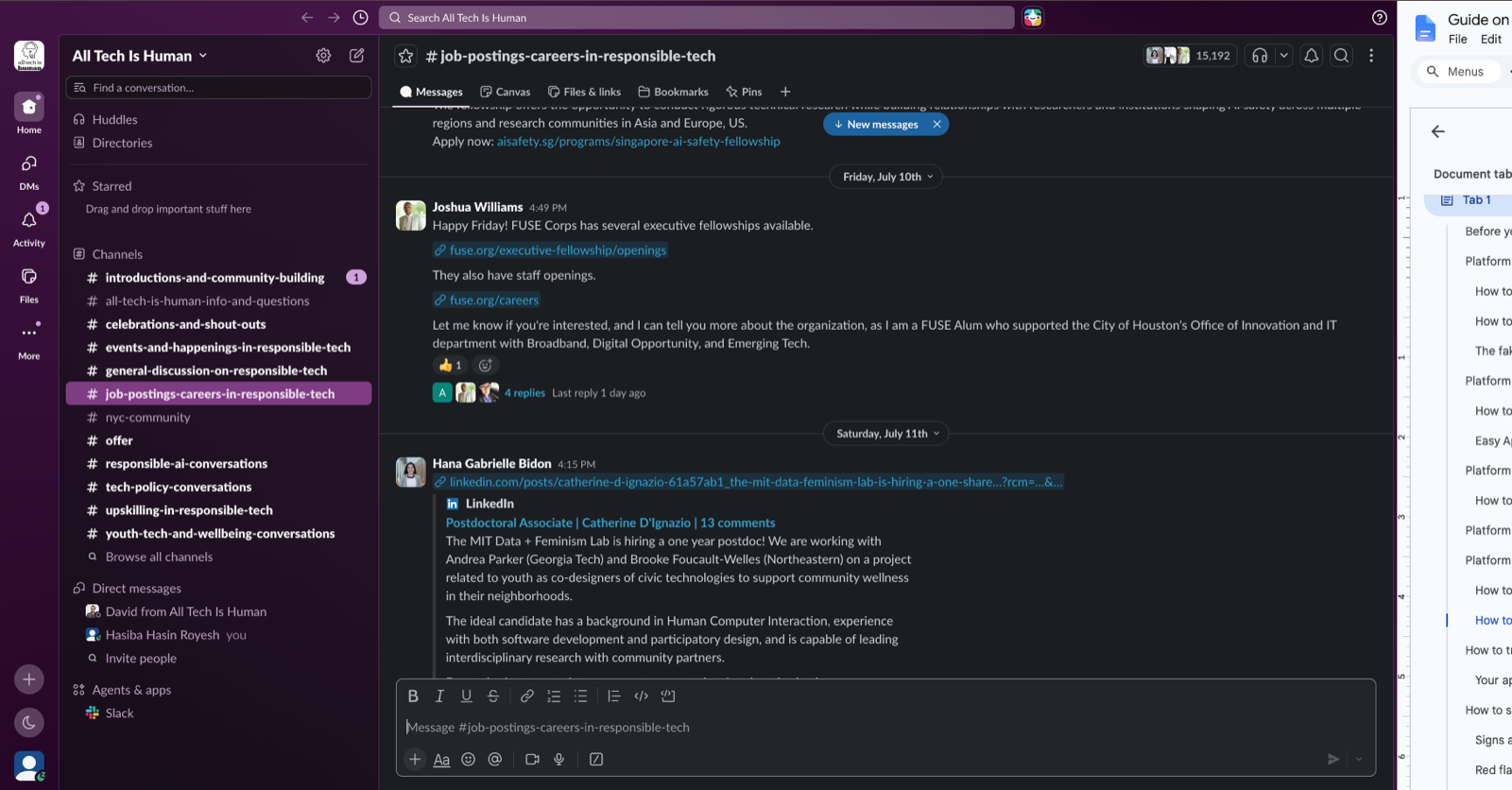
How to find jobs inside the Slack community, step by step
- Look at the left sidebar under Channels. Once approved, the workspace drops a set of default channels into your sidebar. When I joined, mine included: introductions-and-community-building, all-tech-is-human-info-and-questions, celebrations-and-shout-outs, events-and-happenings-in-responsible-tech, general-discussion-on-responsible-tech, job-postings-careers-in-responsible-tech, nyc-community, offer, responsible-ai-conversations, tech-policy-conversations, upskilling-in-responsible-tech, and youth-tech-and-wellbeing-conversations. There is also a Browse all channels link at the bottom.
- Click into the job-postings-careers-in-responsible-tech channel. This is the main jobs channel. When I checked it had over 15,000 members in it alone.
- Read the channel carefully, it is not a standard job board. Scrolling through it I saw a researcher from Rice University looking for law students to annotate European Union artificial intelligence regulation obligations for a paid research role, right next to someone recruiting podcast guests. It reads more like a shared bulletin board across the whole responsible tech field. You have to actually read posts rather than scan titles.
- Click Pins at the top of the channel to see anything moderators have highlighted. Use the search bar in Slack to search within the channel for a keyword like a specific role title or "remote."
- Turn on notifications for this channel only. Click the channel name at the top, open notification preferences, and set it to notify you on every new message for just that channel. The channel moves fast enough that the default workspace settings will bury new postings.
- Look beyond the jobs channel. The events-and-happenings-in-responsible-tech channel surfaces conferences and workshops. City channels like nyc-community (about 2,600 members) are active, I saw people sharing happy hours for tech accountability signatories and registration links for in-person events. The offer channel (almost 14,000 members) is where people post what they can give, coaching calls, consulting availability, collaboration invitations. Roles also get mentioned informally in responsible-ai-conversations and tech-policy-conversations before they appear in the jobs channel.
How to track your applications, and what not to do
I used a click counter at one point to track how many applications I had submitted. It gave me a number. That number told me nothing useful about which companies I had applied to, what stage I was at, or what to follow up on. I do not recommend it.
What I recommend instead is a simple Google Sheet. Here is the setup I use, a Job Application Tracker with one column for each of the following:
- Organization name
- Role title
- Date applied
- Platform (Handshake, LinkedIn, Indeed, All Tech Is Human Slack, company website, etc.)
- Status (Applied, Phone screen scheduled, Online assessment received, Interview, Offer, Rejected, No response)
- Deadline or follow-up date, when you plan to follow up if you have not heard back
- Notes, anything specific about the application, contact name, anything you want to remember
Update this every time you submit an application. When you are applying to multiple things at once this prevents you from applying twice to the same role, losing track of deadlines, and not following up at the right time.
Follow up after two weeks of silence if you have not heard anything and the role seems genuinely active. A short email to the recruiter or hiring manager checking on your application status is professional and sometimes moves your application forward.
How to spot a fake or ghost posting
Not all job postings are actively hiring. This is one of the most frustrating things about job searching in 2025 and 2026. Companies post roles to build pipelines, maintain brand presence, or because they have not cleaned up old listings. Here is how to tell the difference.
Signs a posting is real and actively hiring
- Posted within the last two to four weeks
- Specific and detailed job description about what the day-to-day work actually involves
- Clear application deadline
- The company has verified employees on LinkedIn
- The application portal works and confirms your submission
- You can find the role or team mentioned on the company website
- A named recruiter or hiring manager is attached to the posting on LinkedIn
Red flags
- Posted more than 60 days ago with no update
- Very generic job description that could apply to any company
- No application confirmation after submitting
- An "entry-level" role requiring three or more years of experience, widespread in the industry and deeply frustrating
- The role appears on third-party job boards but not on the company website
- Artificial intelligence-generated outreach email with vague language and no specific details about your background
How to email a recruiter to confirm a posting is real
If you genuinely want a role but are unsure whether it is actively hiring, it is acceptable to reach out directly. Find the recruiter or relevant hiring manager on LinkedIn by searching the company name and filtering for people with titles like "recruiter," "talent acquisition," or the name of the department you are applying to.
Hi [Name],
I came across the [Role Name] posting at [Organization] and am very interested in applying. I wanted to confirm the role is still actively accepting applications before I put together my materials.
I am a [year] computing student at [school] with a background in [one or two relevant things]. I would love to learn more about the team and the timeline if you have a moment.
Thank you for your time.
[Your name]
Keep it short. You are confirming the posting is real and showing genuine interest, not asking for a job in this email. That alone sometimes moves your application to the top of the pile.
How to actually apply, a step-by-step process
This is the process I follow for a single application I genuinely want. Not a checklist, an actual sequence.
- Research the organization first, before opening your resume. Spend 15 to 20 minutes reading their About page, recent reports or blog posts, and news from the last six months. Look at the team page. Find people in the role or department you are applying to on LinkedIn. What you are trying to answer: does this organization actually do what I think it does? Is there something specific about their work that connects to mine?
- Tailor your resume to this specific role. Identify the three to four most relevant experiences you have for this particular role and make those the most prominent items. Read the job description and note the specific skills and language they use. If they say "qualitative research" and you have done qualitative coding, use their language. Applicant tracking systems scan for keywords before a human sees your application. Save as a PDF unless they ask for Word.
- Write a cover letter that sounds like you. 87% of hiring managers say they read cover letters and 65% say they influence hiring decisions (Coursera, 2025). For government and nonprofit roles always submit one. A cover letter should answer three questions: Who are you? Why this organization specifically? What can you actually bring to this role? Keep it to 250 to 400 words. Lead with your strongest and most relevant experience, not with "I am writing to express my interest."
- Submit and log it immediately. Add the application to your tracker before you close the tab. Include the date, platform, and status. Set a follow-up date two weeks out if you have not heard back.
- Follow up after two weeks of silence. A short email to the recruiter confirming your application and expressing continued interest is professional. Most students do not do this. It sometimes helps.
For roles you genuinely want, not just roles that sound fine, put in the full process above. For exploratory applications where you are less certain, Easy Apply or a lighter version is okay. The difference in quality shows in the response rate.
When to apply: a realistic timeline by opportunity type
Summer internships at large tech companies
- Applications open August through October of the previous year
- Deadlines October through December
- What this means: if you want a summer 2027 internship at a large tech company, you need to be applying in fall 2026. This timeline is earlier than most students expect.
Summer internships at nonprofits, government, and mission-driven organizations
- Applications open December through March
- Deadlines January through April, much more variable than Big Tech
- What this means: a more forgiving timeline, but rolling admissions at some organizations means earlier is still better
Key fellowships and their typical deadlines
- United States Digital Corps (usdigitalcorps.gov) - applications typically open in fall for the following summer
- TechCongress (techcongress.io) - applications open early fall, deadline typically October or November
- Siegel Public Interest Technology Summer Fellowship (siegelendowment.org/pitcareers) - deadline typically February or March
- National Science Foundation Research Experiences for Undergraduates programs (nsf.gov) - deadlines from January through March, apply to 10 to 15 programs
- Horizon Fellowship (horizonpublicservice.org) - applications open summer, deadline early fall
- Paul and Daisy Soros Fellowships for New Americans (pdsoros.org/eligibility) - for immigrants and children of immigrants pursuing graduate study in any field, deadline typically late October
Set calendar reminders for every deadline as soon as you find an opportunity you want to pursue. Missing a deadline because you lost track is avoidable and very frustrating.
Quick reference: all platforms and links
General job boards
- Handshake (joinhandshake.com) - best for college student recruiting
- LinkedIn Jobs (linkedin.com/jobs) - best for networking alongside searching
- Indeed (indeed.com) - useful for broader searches beyond computing
- Glassdoor (glassdoor.com) - company reviews and salary data
Public interest technology and mission-driven
- All Tech Is Human Slack (alltechishuman.org/slack-community) - apply to join, short wait for approval
- All Tech Is Human Job Board (alltechishuman.org/responsible-tech-job-board)
- Tech Jobs for Good (techjobsforgood.com)
- Bens Green Jobs (benzevgreen.com/jobs)
- Idealist (idealist.org) - nonprofits and social good
- USAJobs (usajobs.gov) - federal government roles
Fellowships
- United States Digital Corps (usdigitalcorps.gov)
- TechCongress (techcongress.io)
- Siegel Public Interest Technology Summer Fellowship (siegelendowment.org/pitcareers)
- National Science Foundation Research Experiences for Undergraduates programs (nsf.gov/crssprgm/reu/reu_search.cfm)
- ProFellow fellowship database (profellow.com)
- Horizon Fellowship (horizonpublicservice.org)
- Computer Science fellowships list on GitHub (github.com/chinasatokolo/csGraduateFellowships) - comprehensive curated list
- Paul and Daisy Soros Fellowships for New Americans (pdsoros.org/eligibility) - for immigrants and children of immigrants
References
- Kirdani-Ryan, M., Ko, A.J., & Borisova, E.A. (2023). "Taught to be Automata": Examining the Departmental Role in Shaping Initial Career Choices of Computing Students. Computer Science Education. doi.org/10.1080/08993408.2023.2171689
- Coursera. (2025). How to Write a Cover Letter for an Internship: 9 Tips and Examples. coursera.org/articles/cover-letter-for-internship
- Extern. (2026). Entry-Level Computer Science Jobs in 2026: The Real Market and How to Get Hired. extern.com/post/entry-level-computer-science-jobs-2025
- All Tech Is Human. (2026). Slack Community. alltechishuman.org/slack-community
- All Tech Is Human. (2026). Responsible Tech Job Board. alltechishuman.org/responsible-tech-job-board
- ProFellow. (2025). 38 Computer Science Fellowships for Students and Professionals. profellow.com/fellowships/39-computer-science-fellowships
- Horizon Institute for Public Service. (2025). Applications Open for 2026 Horizon Fellowship Cohort. horizonpublicservice.org